New Starlight Xpress H694

This is my new Starlight Xpress H694, 6 millions pixels, ideal for the Takahashi 106ed (q) is a taken over from my faithful QSI632 3 millions pixel. The filter wheel is also new taking 5 filters in the filter disk.


Takahashi 106ed Back Focus Distance 


The Takahashi setup which consisted of both the 106ed, the guidescope 60C, lodestar x2, Starlight Xpress 694 & Filterwheel


Takahashi FSQ-106ED (Europe) specifications

Next Step in my development


The astrophotographers see in the FSQ-106ED one of the best astrographes available for the amateur astronomers. With its focal length of 530mm, an image circle of 88mm and a photographic field of 9,5°, it acts as teleobjective for most powerful CCD and DSR/DSLR cameras of the market.
Based on a Petzval quadruplet optical design with apochromatic ED glasses, the FSQ-106ED is optimized for wide-field imaging of the deep sky. It offers a flat field, and comes equiped with a built-in camera angle adjuster and an oversized rack-and-pinion focuser. To minimize the size of the optical tube, it includes a retractable dewshield and an important backfocus


Optical specifications

Spec.FSQ-106ED
Optical designModified Petzval quadruplet apochromat
Aperture106 mm
Standard
Focal length530 mm
Focal ratioF/5.0
Resolution1.09"
Limiting magnitude11.8
Light grasp220x
Image circle88 mm
Photo field9.5°
Back focus186.38 mm
Metal back178 mm


With QE-Reducer
Focal length385mm
Focal ratioF/3.6
Image circle44mm
Photo field6.5°
Metal back72.2 mm


Part 4 - Assembling the Hardware


The assembling of a permanent observatory either with roof or without, you still require a considerable of equipment. The mount will be the main whereby you would have to build around it.
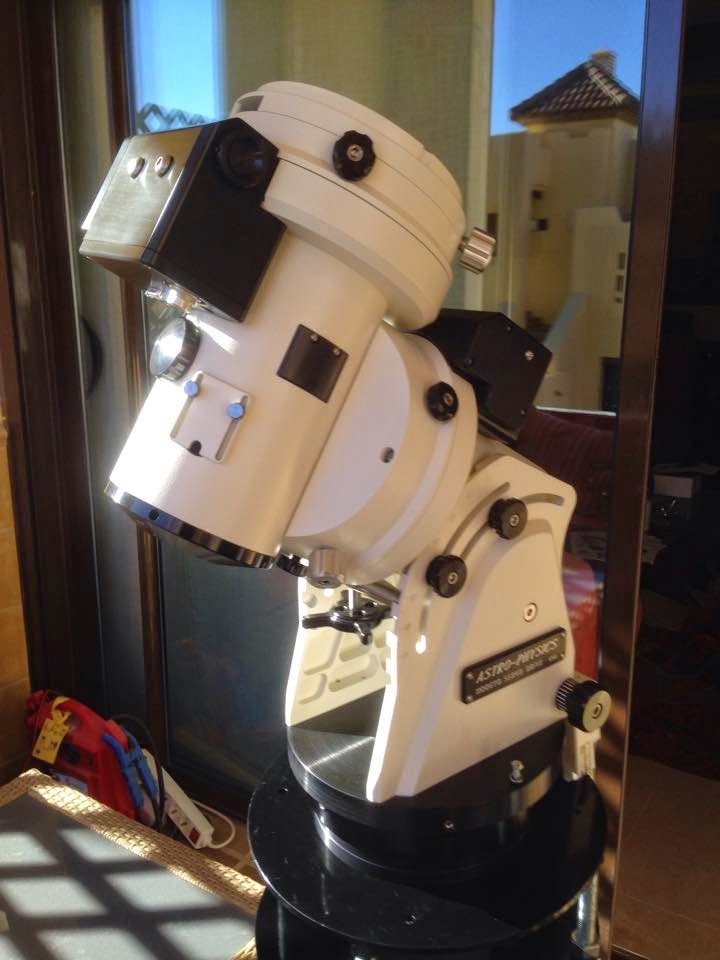


The AP mount 1100GTO is an excellent mount for precision astrophotography. This particular mount does not include the Absolute Encoders. AE are the latest technology in precision guilding.On axis encoders have many advantages, they should not be considered a panacea for taking long unguided photos. External factors such as optical tubes that bend and differential refraction that conspire to degrade pointing and tracking accuracy cannot be fixed with on axis encoders.

Advantages of on axis encoders:

1. Mount is marginally easier to use by eliminating the need to initialize the mount's position (through homing or synchronization) at start up or after power loss.

2. Provides improved pointing and tracking accuracy by continuously monitoring the position of the main gear, as opposed to an encoder mounted to the motor's drive shaft.

3. Virtually eliminates errors caused by periodic error as well as the need to train periodic error.

4. Transparent operation; the on-axis encoder hardware and electronic sensors are integral to the mount's mechanical design, control system electronics and control software.

Disadvantages of on axis encoders:

1. Cost. On axis encoder technology is expensive. Not everybody can afford it, although I am sure that everybody would like to have it. 

On,y two others mounts provide AE, 10Mircon & APA, apart from these three supplier, I am not aware of any other.


The Mount would need a pier to hold it steady and strongly fixed, I decided on a 8" diameter steel pier with a top movable flange to avoid complication when the mount is fixed on.


This is the top flange with the AP adaptor that will hold the AP mount


I also included a tray for the mount.


Finally the RAPA polar alignment scope.


The final setup with all the units assembled.


Apart from the setup, there are all the bits & pieces that will assist me to control better the mount.

The Mount Hub Pro, is an excellent addition to all mounts, it will provide just a single USB cable from the unit to the laptop. From the hub I will connect (input)at least five accessories, like;CCD, AO, Dew Heaters, gilder camera and so on. Instead of having all these units cables running from the pier to the laptop, only one output will be used from the hub.


Part 3 - Testing software to make the mount and all other units function 


This diagram comes from AP and shows the mount control panel, hardware & software connectivity 


First endeavour on the new Astro-Physics mount 1100 GTO

The alignment routine is a bit different to what I've used before on the HEQ6 and CGEM. The AP will assume perfect orthogonality within the mount itself, so if you want to use Polaris as an alignment star you need to be spot on with the OTA mounting. Best avoided with my gear I think. You will centre one star and then select star two. The mount will slew there. Unlike routines I'm used to, the AP routine expects no internal errors, but instead assumes your polar alignment is off if star two isn't on the cross hairs! So you use the alt/az adjusters to physically centre star two. A few iterations of this will have you aligned with the NCP to great accuracy. To target cone error you'll need to flip and do a routine to cancel the effects of a misaligned OTA. (I don't flip so won't bother with that until I take this one out to a dark site)
It's an absolute joy to use in short. It adjusts with no effort at all in alt and az to find Polaris. Polar alignment was extremely easy using the new RAPAS - Righ angle polar alignment scope. This has a built in diagonal, and the reticule has circles and hour markings rather than the constellations. It will make for even easier setup with less neck strain.
It slews very precisely, and I can't see any traces of backlash judging by star movements on the CCD. I didn't go through the full routine, but did a good PA and then I synced on Kochab. In theory this is all you need to do to get going - and it sure was! Any target I picked from the keypad appeared almost on the cross hairs straight away.


I set guide rate to 0.5 sidereal, on the AP Ascom V2 in Maxim DL calibrated quickly using 1 second intervals - from then on it was plain sailing! I have been used to the graph constantly going off scale with the EQ6, I've seen Dec just trail off never to return... I used to resort to high aggressiveness and max one second interval to hold it by the ear. Not so this time around!


First alignment only using a one polar alignment, then selected the first star (Kochab) and it when directly to the center of the cross-hair. This is a 10 seconds unguided.
Kaypad


Part 2 - Cabling and Power Supply


It is important that you cable correctly from the mount to the computer /Laptop, my recommendation is to use the minimum cabling from the mount to the PC, but having said this, you would need to feed not only the power supply to the mount, but also the communication /transfer of data from mount, CCD, guider camera etc.


To overcome the spaghetti of cables surrounding the mount and telescope, and avoiding many meters of cables passing through the carriers from the mount to the 'control center' I purchased a 'Mount Hub' (see above).

This became a tricky situation, First you need to place the Hub in a position that will move with the scope, camera etc, this way once you connect the cables from the units to the hub they will be kept in position. The other benefit is that only one, say cable connecting from the Hub to the Laptop is used, instead of having a minimum of four /five (camera x2, Dew heater, OA, auto focuser).

The mount cable I decided to separate from the mount hub, as i wanted that communication from it to the laptop was singular in avoid fluctuation of data.


The cables carriers/trunking will have to be water proof (in my case) to withstand the weather elements, even if the distances is not too much like in my case, it is vital that cables are probably sealed and separated from communication cables and power supply cables, this will avoid affecting with the data coming from the mount and back.


 The following images shows how you will need to separate the data to the power cables, I passed two RS232 cables, both will connect to the Astro-Physics Mount, and an extra two USB cables, one that connected to the Mount Hub Pro, the other is reserve just in case I used it.

On the power supply, I passed two 12V 6amps cables for the Mount Hub Pro, and the other one to the AP Mount. I also passed two 240V cables to supply the QSI632 CCD and another as reserve.


To have a constant power supply the best solution is that it will come from the wall socket, having batteries to supply the mount and all the other units, is not ideal given that after a few hours taking images there is a good possibility that the power will fall.

The solution I found (after searching in the net for days) was a converter unit coming from 230v to 12-15v, 7amps with 5 constant.


These two units will provide a stead power supply without interference to the units from the control center.